
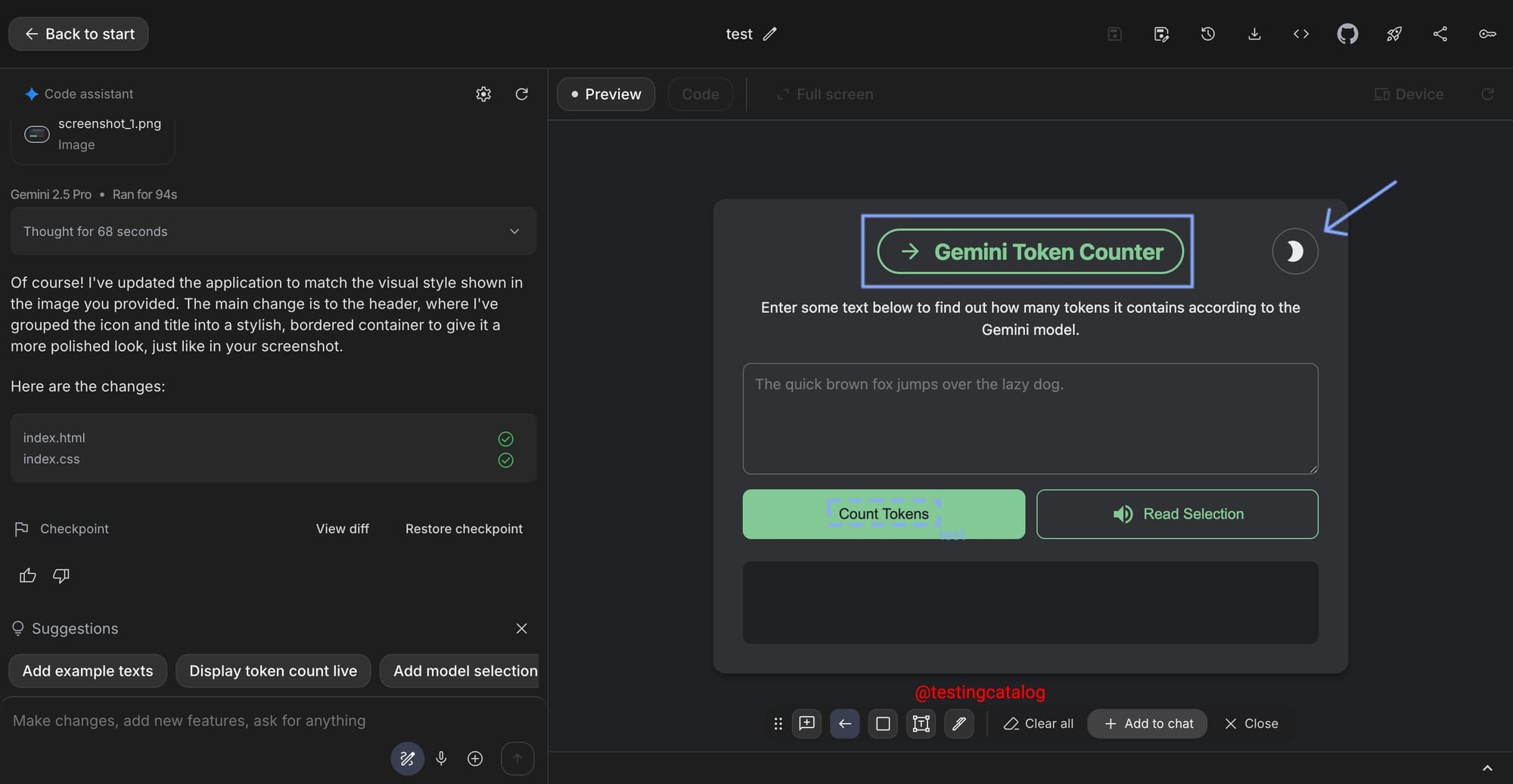
Google’s ongoing improvements to AI Studio, especially with the new dictation feature in Apps Builder, are positioned to help developers and power users who prefer a faster, hands-free workflow. This feature lets users speak their prompts instead of typing, which brings the experience closer to what’s popular in coding tools that emphasize efficiency. For those regularly building and testing apps with AI, this means they can iterate more quickly and lower the barrier for multi-step prompt input.
ICYMI: AI Studio Build section now has a dictation button! Users are now able to dictate their prompts for Gemini to build web apps.
— TestingCatalog News 🗞 (@testingcatalog) October 7, 2025
Vibe coding mode 🤖 pic.twitter.com/MPpssJ03dX
The upcoming annotation feature in Apps Builder is not live yet, but it’s being tested internally. This will let users add visible comments, error pointers, and highlights directly to the visual workflow canvas. Screenshots with these visual notes can then be shared in chat, allowing prompts to reference specific UI areas, an improvement that could make troubleshooting and collaborative development with Gemini’s AI more targeted. The ability to “point” the model at an exact region should be particularly valuable for teams, product designers, and testers managing complex agent flows, where context precision matters.
There’s no clear public timeline for the annotation rollout, but such features tend to surface when Google refreshes its core UI, which is rumored to happen in the next few weeks. These updates fit Google’s broader strategy to support more multimodal and collaborative development environments, giving Gemini models richer context and users greater control over the prompt-design loop. Future Gemini releases are expected to take fuller advantage of these annotation and dictation inputs, likely improving reliability in tasks that need focused context or granular UI understanding.


